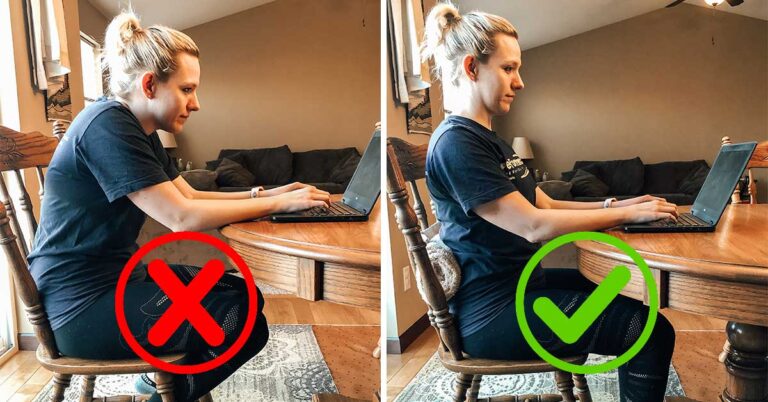
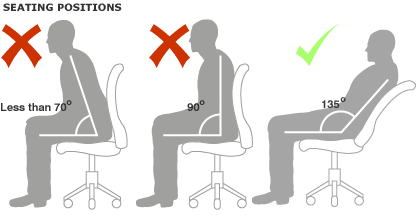
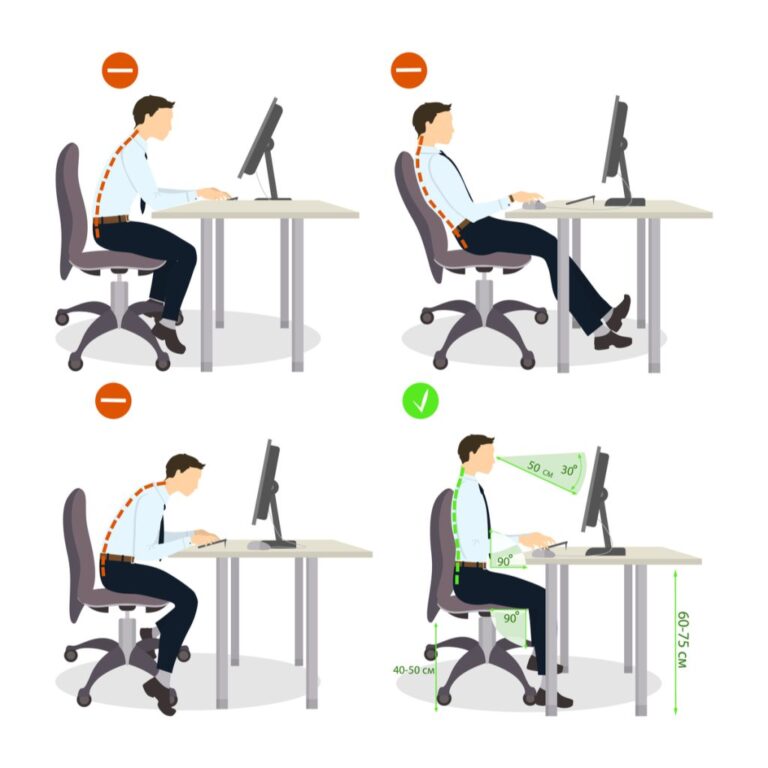
Sit with feet flat, knees at right angles, back supported, shoulders relaxed, and head neutral.
I’ve spent years helping people fix aches from long hours at a desk, and I’ll walk you through exactly how to sit properly on a chair so you feel stable, avoid pain, and stay productive. This guide blends simple steps, chair setup tips, quick fixes, and real-life lessons to make posture easy and lasting.
Why posture matters and what it does for your body
Good sitting protects your spine, reduces muscle strain, and helps breathing and focus. Slouching and awkward angles add pressure to discs and tighten muscles. Learning how to sit properly on a chair cuts pain and boosts energy. Small changes in seating can change how your body feels after a long workday. Studies and ergonomic guidelines back the idea that posture matters for comfort and long-term spine health.

Step-by-step: how to sit properly on a chair
Follow these short steps every time you sit. Keep each move simple and steady.
- Sit back so your buttocks touch the backrest.
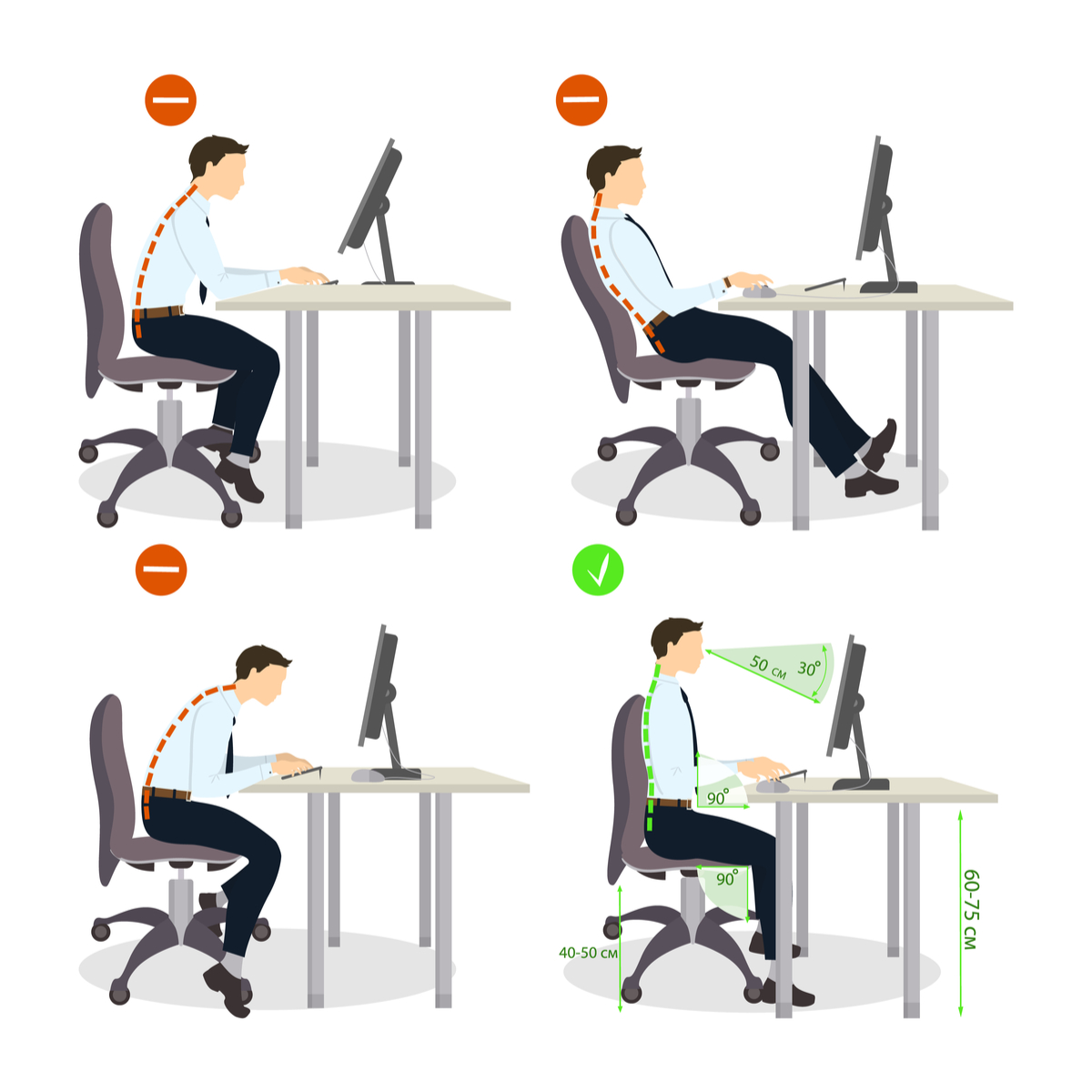
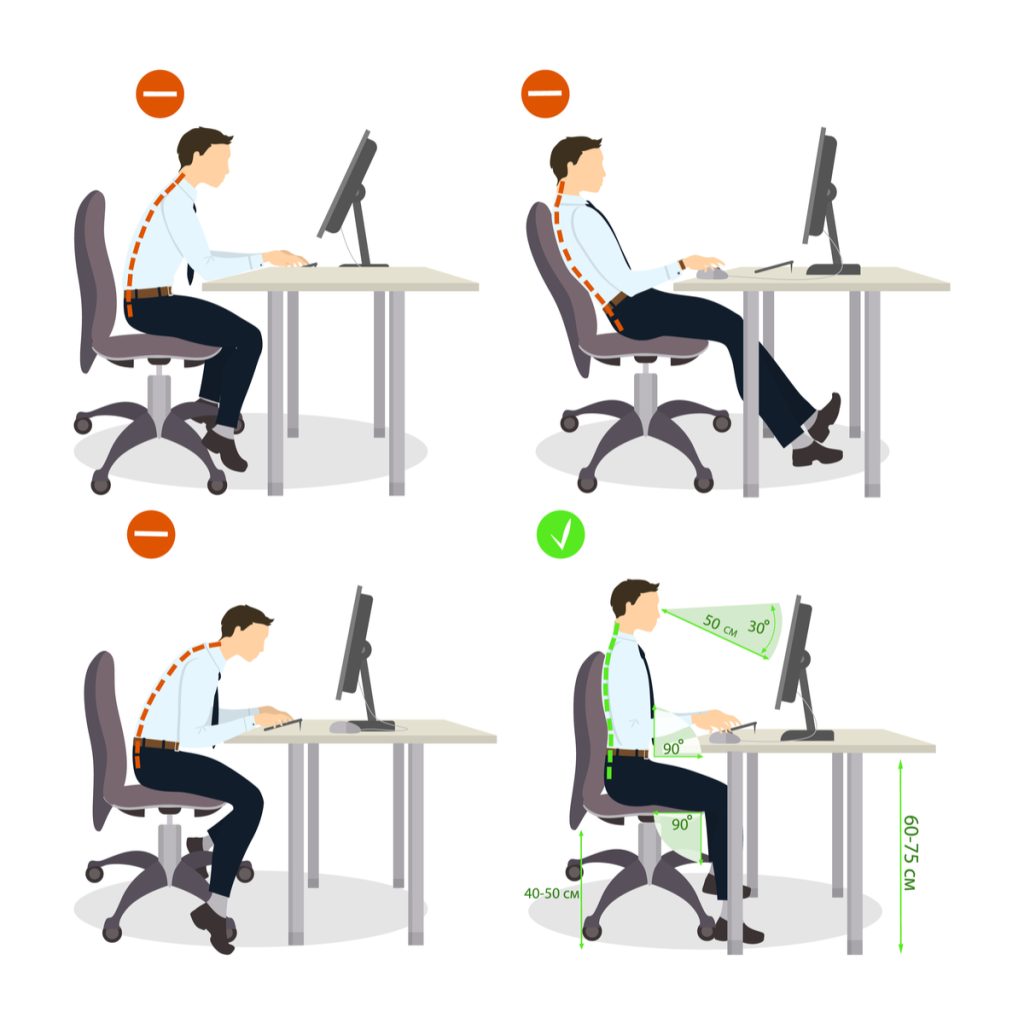
- Plant both feet flat on the floor. Adjust seat height so knees form about a 90-degree angle.
- Align hips and knees at the same level or hips slightly higher.
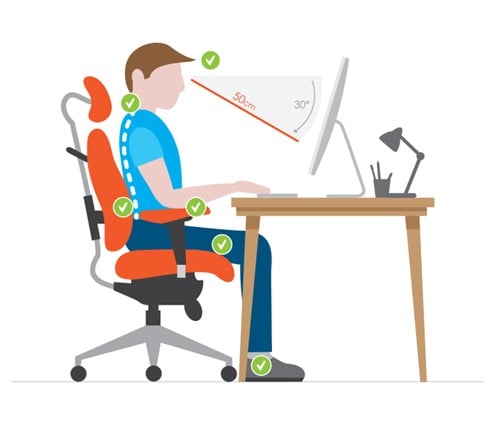
- Use lumbar support to fill the small curve in your lower back.
- Keep shoulders relaxed and down, not rounded forward.
- Position your head so ears align over shoulders and chin is neutral.
- Keep forearms parallel to the floor with elbows close to your sides when typing.
- Move every 30 to 45 minutes: stand, stretch, or walk for a minute.
Practicing these steps builds a habit. When I corrected my own desk setup, I noticed less neck pain within a week. This sequence shows how to sit properly on a chair in a clear, repeatable way.
Choose and adjust a chair for best results
The right chair makes posture easy. Look for these features and adjust them slowly.
- Height adjustability so feet rest flat.
- Lumbar support or an adjustable lower-back pad.
- Seat depth that lets you sit with 1–2 inches between the seat edge and the back of your knees.
- Armrests that support your arms without lifting shoulders.
- A stable base and smooth casters if you move often.
If your chair lacks lumbar support, add a small cushion or rolled towel. Choosing the right chair is a core part of how to sit properly on a chair for long hours.

Common mistakes and how to fix them
Spot the bad habits and swap them for easy fixes.
- Sitting on the edge of the chair — move back and use the backrest.
- Crossing legs for long periods — keep both feet flat to reduce hip strain.
- Slouching forward toward the screen — bring the screen closer or raise the chair and use a footrest.
- Leaning to one side — center yourself and frame support with both arms.
- Tucking the chin — lift your screen so your eyes look slightly downward.
I used to lean forward when focusing. A small desk riser fixed my screen height and cured my forward slump. These are practical ways to learn how to sit properly on a chair and keep it simple.

Desk setup and screen placement
Your screen and desk affect posture a lot. Adjust them as follows.
- Top of screen at or slightly below eye level.
- Screen about an arm’s length away for clear focus.
- Keyboard and mouse close to your body to avoid reaching.
- Desk height that allows wrists to stay straight while typing.
Correct desk layout complements how to sit properly on a chair. When I moved my monitor closer and higher, I stopped jutting my chin forward and felt less neck tightness.
Exercises and micro-breaks to support sitting
Small moves keep muscles fresh and reduce fatigue.
- Seated pelvic tilts to activate lower back and core. Repeat 8–12 times.
- Shoulder rolls to release tension. Do sets of 10 forward and back.
- Neck mobility: slow side-to-side and chin tucks, 6–8 reps.
- Standing stretch breaks every 30–45 minutes for one to two minutes.
These short practices help you maintain how to sit properly on a chair all day. I schedule a timer reminder and it changed my comfort level during long projects.

Troubleshooting aches and when to seek help
If pain stays or worsens, pay attention and act.
- Mild stiffness: change posture, add breaks, and try mobility exercises.
- Ongoing pain in back, hips, or shoulders: consult a healthcare professional.
- Numbness or tingling in arms or legs: seek medical advice promptly.
Ergonomics helps most people, but persistent symptoms need an expert. Knowing when to get help is part of learning how to sit properly on a chair safely.

Real-life tips and mistakes I’ve learned from
I’ve helped clients and adjusted my own habits. Here are honest, practical lessons.
- Don’t expect perfection at first; small wins matter.
- A simple lumbar roll works better than many fancy gadgets.
- Movement beats static posture — sitting “perfectly” without breaks still causes issues.
- Customize rules to your body. One size does not fit all.
One client switched chairs and added short walks. In weeks, their daily back pain dropped. These stories show the real payoff when you commit to how to sit properly on a chair.

Quick PAA-style questions
How often should I adjust my sitting position?
Adjust every 20 to 45 minutes by standing, stretching, or changing posture for one to two minutes.
Can a soft chair be bad for posture?
Yes. A chair that is too soft can let you slump and lose lumbar support, increasing back strain.
Is a lumbar pillow necessary?
Not always. Many people benefit from a lumbar pillow, but some chairs have built-in support that is enough.
Frequently Asked Questions of how to sit properly on a chair(make it h2 tag)
What is the best seat height for proper sitting?
Set seat height so your feet are flat and knees are at about 90 degrees. This aligns hips and knees for even weight distribution.
How do I keep my lower back supported?
Use the chair’s lumbar support or add a small rolled towel to fill the curve in your lower back. Sit back so the support stays under your lumbar curve.
How often should I take breaks while sitting?
Take short breaks every 30 to 45 minutes to stand, stretch, or walk for a minute or two to reduce stiffness and improve circulation.
Are armrests important for posture?
Armrests help when they support your forearms lightly without lifting your shoulders. Adjust them so elbows rest near your sides.
Can sitting properly reduce headache and neck pain?
Yes. Proper alignment of the head and screen height reduces neck strain and can lower the frequency of tension headaches.
What if my feet don't reach the floor?
Use a footrest to keep feet flat and knees at the right angle. Proper foot support helps maintain spinal alignment.
Will improving my sitting posture fix all my pain?
Improving posture helps many people, but chronic or severe pain may need professional assessment and broader treatment.
Conclusion
Mastering how to sit properly on a chair is about simple, repeatable steps: feet flat, back supported, shoulders relaxed, and head neutral. Pair the right chair and desk setup with movement and short exercises to prevent pain and boost comfort. Start with one change today—adjust your seat height or add lumbar support—and track how you feel over a week. If this article helped, try the tips at your desk, leave a comment with your experience, or subscribe for more practical ergonomics advice.