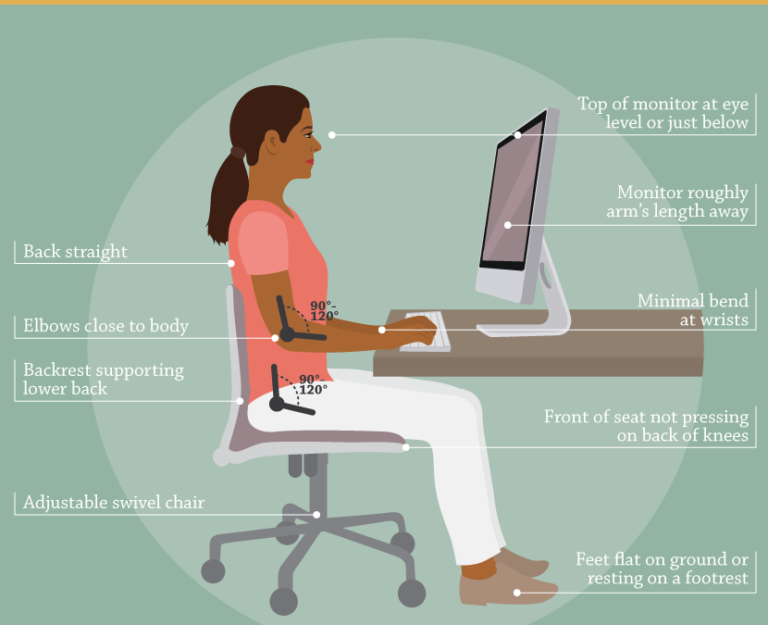
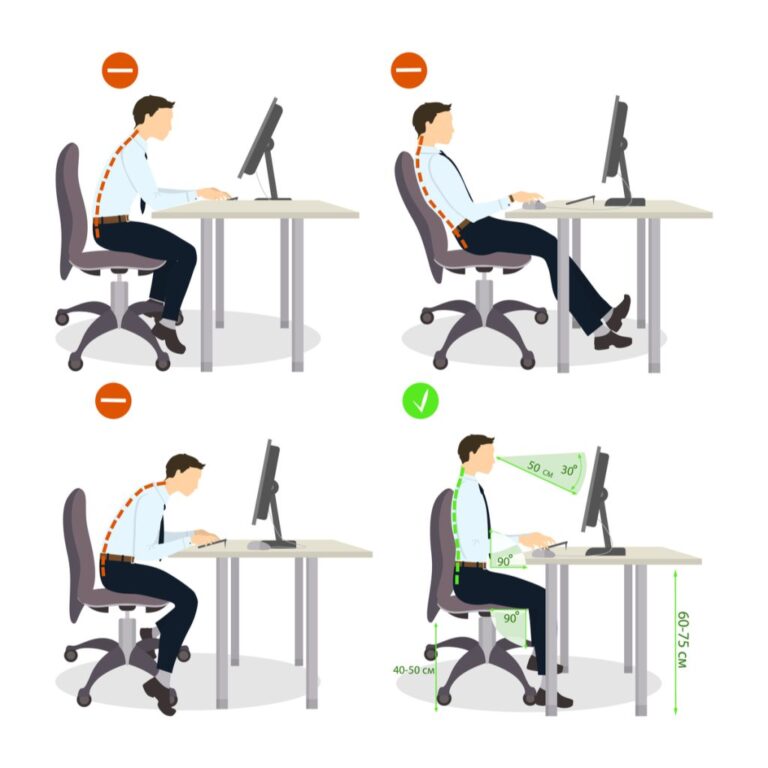
Sit with a neutral spine, feet flat, hips slightly higher than knees, and screen at eye level.
I have spent years helping people fix pain from long work hours. This guide distills proven ergonomics, simple steps, and easy habits to help you adopt the best sitting posture for long hours. Read on for clear setup steps, quick fixes, low-effort stretches, and real-world tips I use every day.
Why posture matters for long hours
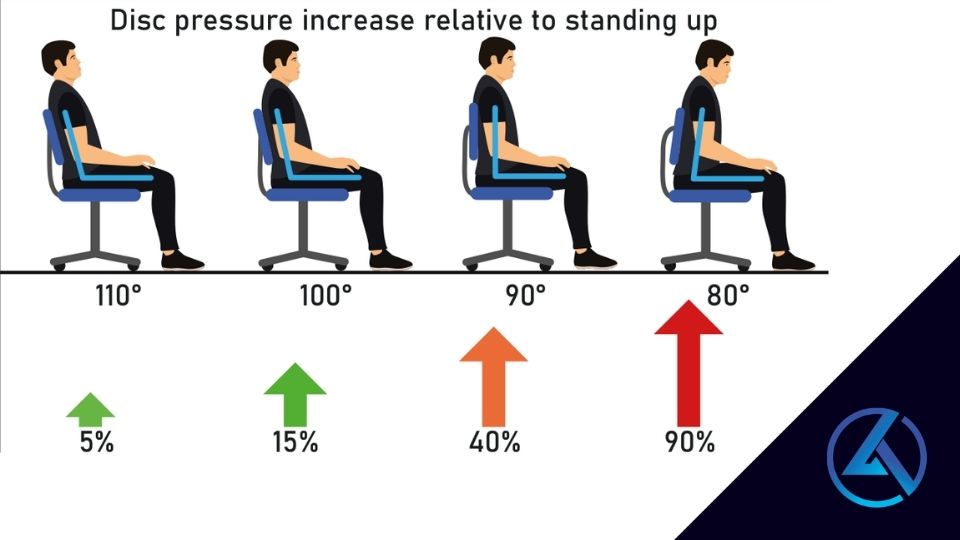
Good posture lowers pain. Sitting poorly strains the low back, neck, and shoulders. Long hours make small faults grow into big problems. The best sitting posture for long hours reduces pressure on discs and keeps nerves happy.
Bad posture can slow you down and hurt mood. It can cause tight hips, sore wrists, and tired eyes. Fixing posture often improves focus and energy. Small changes early stop bigger issues later.
What is the best sitting posture for long hours?
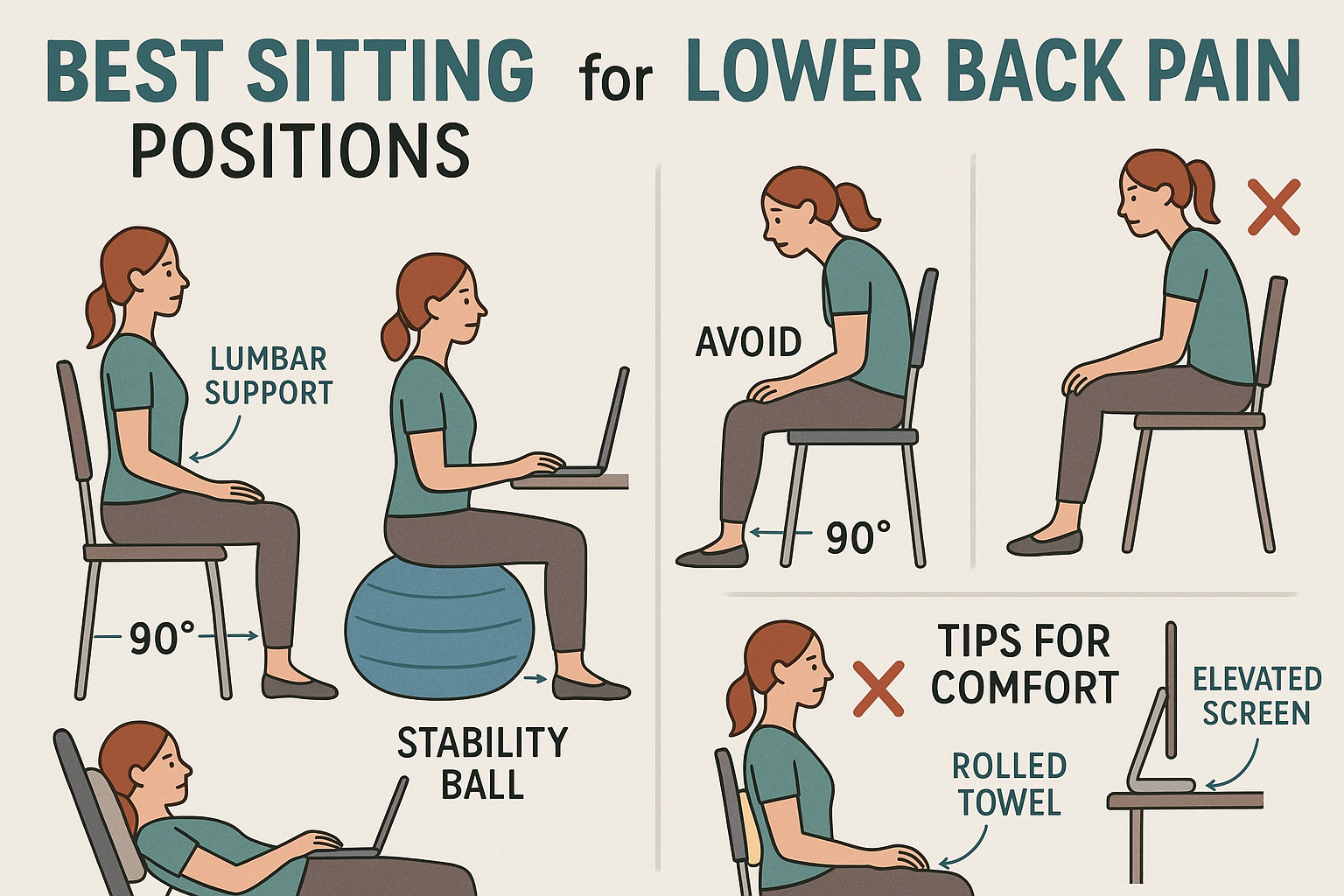
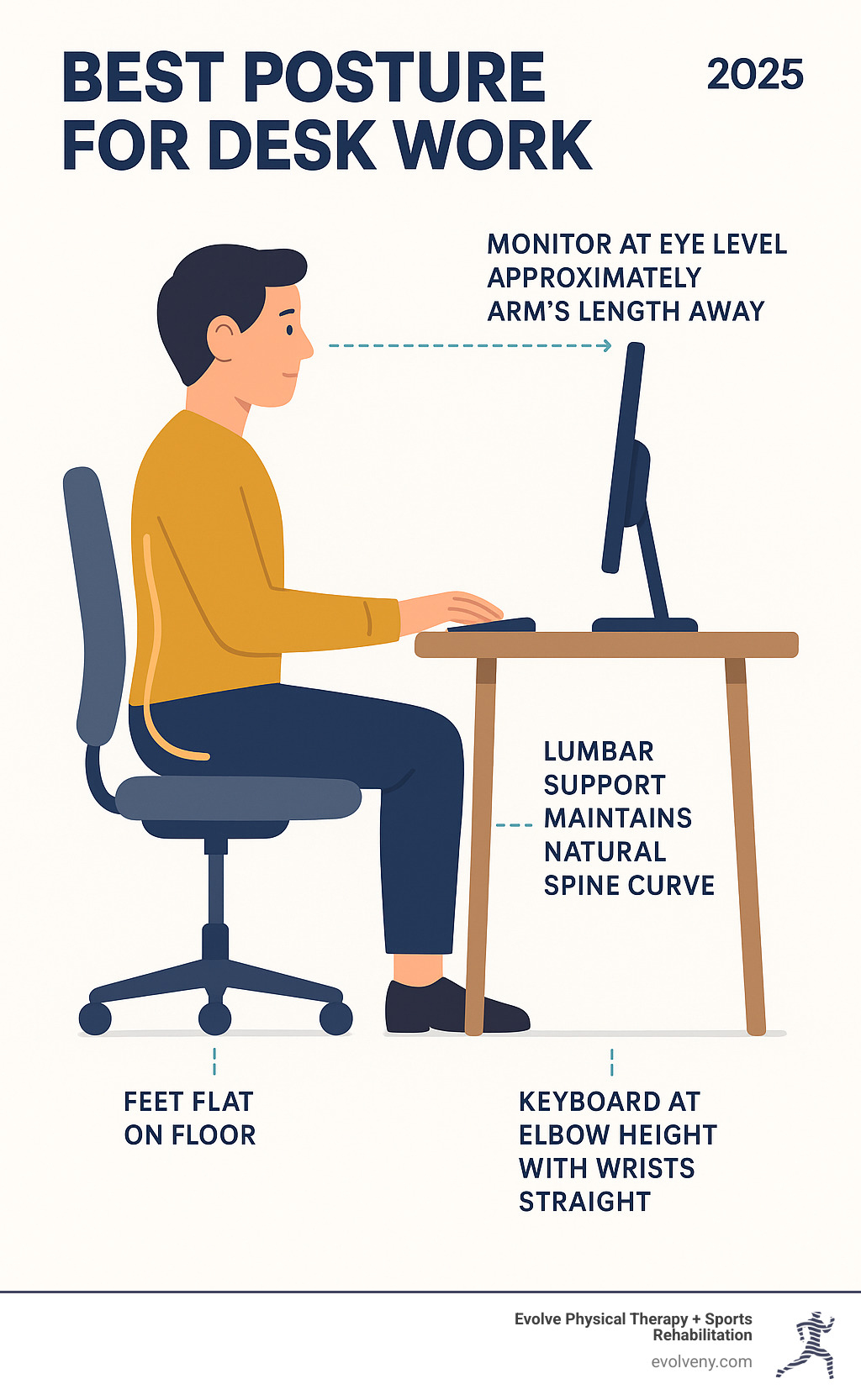
The best sitting posture for long hours keeps your spine neutral. Your ears should be over your shoulders. Your shoulders should be over your hips. Your feet should sit flat on the floor.
Key elements of the best sitting posture for long hours:
- Sit with a neutral spine, keeping the natural curve in the lower back.
- Keep feet flat on the floor or on a footrest if needed.
- Position knees at or slightly below hip level.
- Keep hips pushed back into the chair so the back rests on the lumbar support.
- Keep shoulders relaxed and elbows close to the body at about a 90-degree angle.
- Keep the top of the screen at eye level to avoid forward head posture.
Quick setup steps to reach the best sitting posture for long hours:
- Adjust chair height so feet are flat and knees form a 90-degree angle.
- Move hips back and use lumbar support or a small cushion.
- Raise monitor to eye level using a stand or stack of books.
- Bring keyboard and mouse close so elbows stay near your sides.
People also ask:
How often should I adjust to the best sitting posture for long hours?
Aim to check posture every 20 to 30 minutes. Small adjustments keep muscles active and reduce strain.
Can a chair alone give the best sitting posture for long hours?
A good chair helps a lot, but posture also needs screen height, keyboard placement, and movement.
Is standing better than the best sitting posture for long hours?
Standing helps when mixed with sitting. Alternate between sit and stand to reduce prolonged load.
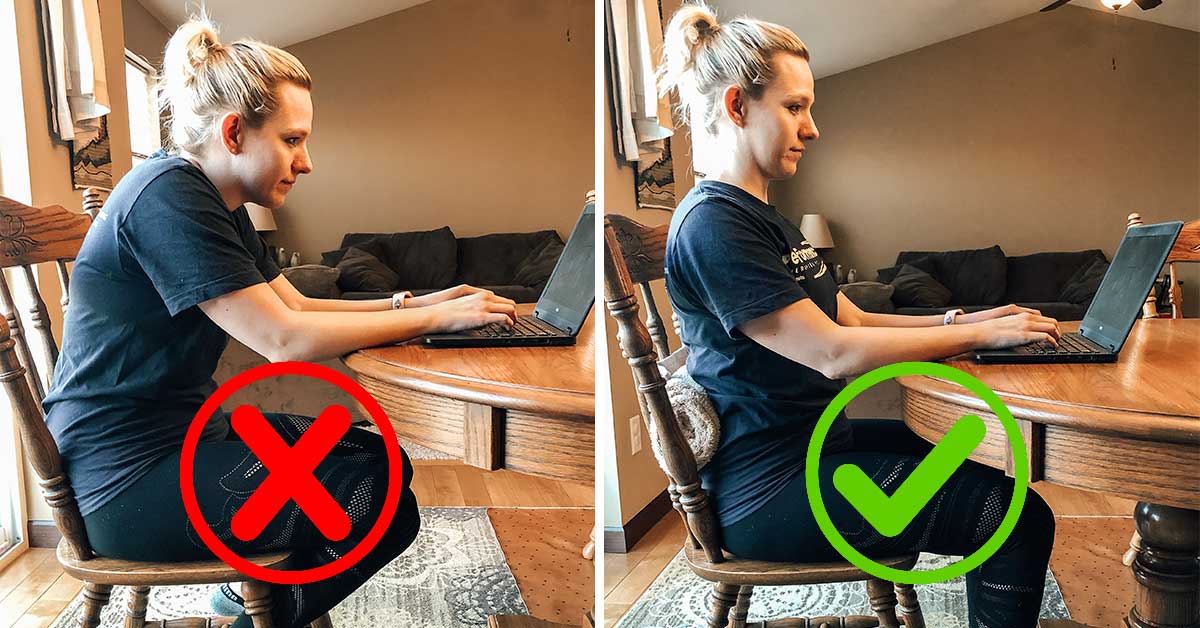
Ergonomic setup for long sessions
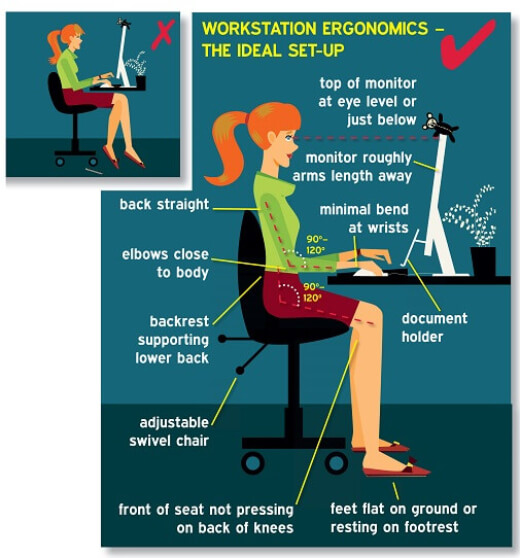
A clear desk setup makes the best sitting posture for long hours easy to keep. Arrange the main items within arm’s reach. Use tools that support neutral joint positions.
Essentials to set up:
- Chair with good lumbar support and adjustable height.
- Desk at elbow height so forearms are parallel to the floor.
- Monitor placed at arm’s length and top of screen at eye level.
- Keyboard and mouse close to the body to avoid reaching.
- Footrest if feet do not sit flat with chair adjusted.
Simple checks you can do now:
- Sit back fully in the chair. Does the chair support your low back?
- Raise or lower the monitor until you can read without bending your neck.
- Move keyboard and mouse so your wrists stay straight.
Movement, breaks, and tiny habits
Even with perfect posture, sitting still is not good. The best sitting posture for long hours includes movement breaks. Short pauses ease muscle tension and boost blood flow.
Easy break ideas:
- Stand and stretch for 1–2 minutes every 30 minutes.
- Do a 5-minute walk or march every hour.
- Use a timer or app to remind you to move.
Simple stretches to pair with good posture:
- Seated spinal twist for the lower back.
- Neck tilts and shoulder rolls for upper tension.
- Hip flexor stretch to counter tight front hips.
Sample micro-routine:
- Work 25 minutes while keeping the best sitting posture for long hours.
- Stand and do 1 minute of marches or calf raises.
- Stretch arms overhead and roll shoulders.
- Return and reset posture.

Common mistakes and how to fix them
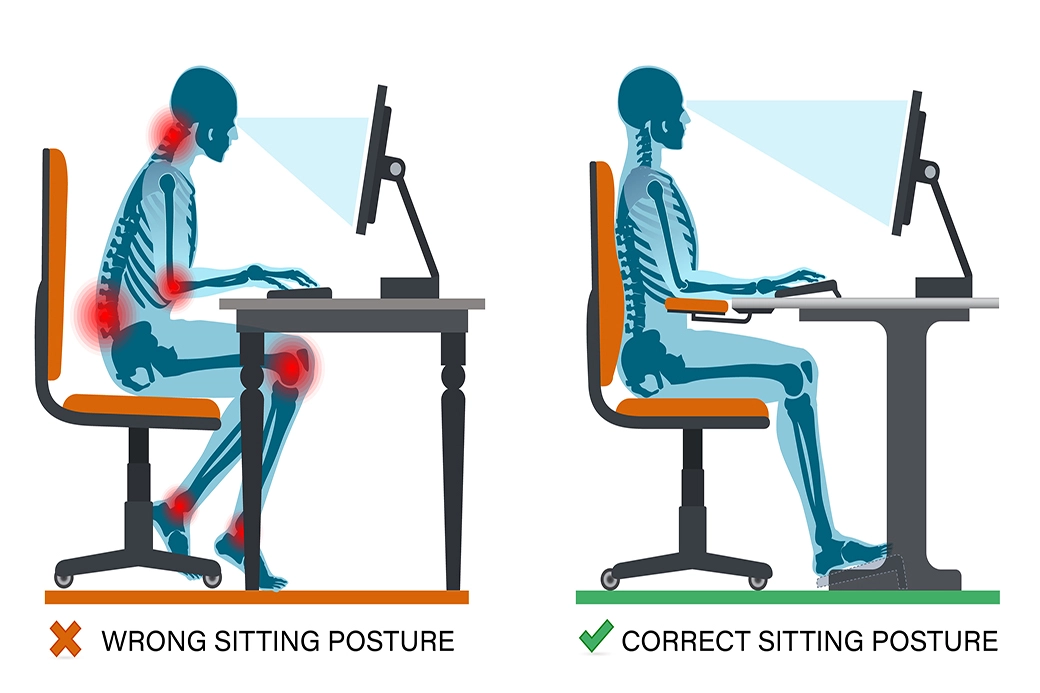
Many habits undo the best sitting posture for long hours. Spot the error and correct it quickly.
Common fault and fix:
- Slouching forward: Move hips back and use lumbar support.
- Forward head: Raise your monitor and pull your chin back gently.
- Arms too high or low: Adjust chair height or keyboard tray so elbows are near 90 degrees.
- Crossing legs: Keep feet flat to avoid hip and back strain.
- Sitting without breaks: Set a simple timer to stand often.
Make one change at a time. Small wins add up.

Personal experience and practical tips
I tested chairs, desks, and timers for years. I once had wrist pain from reaching too far. Fixing keyboard position and using wrist-neutral tools eased the pain in two weeks. I also found that a small lumbar roll made long calls much easier.
Lessons I learned:
- The cheapest fix is movement. Timers beat perfect gear every time.
- A midrange chair plus good habits often beats an expensive chair and no breaks.
- Test changes for a week. If pain drops, keep it.
Real tip: take photos of your sitting pose. You will see small issues you miss by feel.
When to seek professional help
If pain stays or makes daily tasks hard, see a professional. Seek a physical therapist or ergonomics specialist when:
- Pain lasts more than a few weeks despite changes.
- You have numbness, tingling, or weakness in arms or legs.
- Pain limits walking or sleep.
A specialist can tailor the best sitting posture for long hours to your body. They can test movement and suggest exercises or tools.
Frequently Asked Questions of best sitting posture for long hours
What is the single best tip for the best sitting posture for long hours?
Sit with your hips back in the chair and use lumbar support while keeping feet flat. This keeps the spine aligned and eases pressure.
How often should I get up if I sit for long hours?
Stand or move for one to two minutes every 30 minutes and take a longer walk every hour. Small breaks protect your spine and joints.
Can desk height fix posture problems?
Yes. Proper desk height keeps wrists and elbows neutral. Combine desk height with chair and monitor adjustments for best results.
Is a standing desk better than sitting for long hours?
A standing desk is useful when alternated with sitting. Too much standing can also cause issues, so mix both for balance.
What chair features support the best sitting posture for long hours?
Look for adjustable lumbar support, seat height, and armrests. A chair that lets you sit back and maintain a neutral spine works best.
Will stretching fix my posture permanently?
Stretching helps tight muscles but does not fix posture alone. Combine stretches with better setup and regular movement to see lasting change.
Conclusion
Adopting the best sitting posture for long hours is a small habit that gives big returns. Start with chair height, lumbar support, and monitor placement. Add short breaks and simple stretches to protect your back, neck, and joints. Try one change today, track how you feel for a week, and adjust as needed. Leave a comment about your setup or subscribe for more posture tips and quick exercises.